Creating a website takes a lot of hard work. You might spend days writing an amazing story or report, but then you forget to make it look good on the screen. If you force your visitors to download heavy files or read on an ugly page, they will leave your site very fast.
To make sure people read your hard work, you need the perfect tool to show files right on your site. This brings us directly to the EmbedPress vs Document Embedder debate that many site owners face.
In this fun guide, we will explore the EmbedPress vs Document Embedder matchup to see which tool helps your website the most. Choosing the best document embed plugin is the secret to keeping your readers happy. Let us dive into the details and find the right fit for you.
TL;DR
Too long? Did not read? Here is the quick summary of the comparison between two of the popular WordPress embedding solutions, EmbedPress vs Document Embedder.
| Feature | EmbedPress | Document Embedder |
| Primary Focus | All-in-one multimedia hub for 250+ sources | Focused specialist for 10+ office file types |
| Setup Experience | Interactive wizard and visual dashboard | Minimalist and straightforward setup |
| Unique Visuals | Interactive 3D Flipbooks and custom branding | Clean and classic document viewing |
| Analytics | Deep engagement tracking and user behavior | Simple hosting without advanced data |
| Best For | Marketers want high engagement and variety | Users needing a simple office document viewer |
Strategic Overview: Which One Fits Your Goals?
Based on our detailed review, here is how these two plugins handle the most important parts of your content strategy.
| Category | EmbedPress Strategy | Document Embedder Strategy |
| User Engagement | Uses interactive media and 3D effects to keep users on the page longer | Provides a distraction-free reading experience for office documents |
| Site Performance | Includes smart lazy loading to keep your website running fast | Lightweight code built for speed and simple file delivery |
| Brand Identity | Allows custom logos, colors and CTA buttons on the viewer | Keeps things consistent with a simple and clean layout |
| Content Variety | Combines PDFs with YouTube, Spotify and social media feeds | Focuses strictly on Word, Excel, PDF and PowerPoint files |
📝 Why Document Embeds Matter for Website Performance & SEO
In 2026, user engagement is everything. According to Master Blogging, 8 out of 10 readers check out a blog post’s headline only. If you only provide static text, visitors will bounce before they even read your core message.
Using a reliable WordPress document embedder keeps users engaged on your site for much longer. In fact, studies from DemandGen and Outgrow show that interactive content generates 52.6% more engagement than traditional static pages!
By blending videos, social feeds and interactive documents, you create a rich multimedia experience. Here is exactly why modern embeds are critical for your success:
- Increases Dwell Time: Visitors spend longer on pages featuring interactive elements compared to standard text.
- Reduces Bounce Rates: Offering visual breaks and interactive content prevents users from immediately clicking the back button.
- Boosts SEO Rankings: Every time you embed interactive items like A PDF in WordPress using an engaging viewer, you signal to Google that your site offers high-value content.
Learning how to embed PDF in WordPress sites properly transforms your website from a boring blog into an interactive hub. Do not let your hard-earned traffic go to waste on a plain page!
Compare EmbedPress vs Document Embedder for Document Embedding in WordPress
When you look for a fast and helpful WordPress document viewer, you will quickly notice these two popular choices. Both plugins promise to get rid of clunky download links and make your website much easier for people to use. However, they solve the problem quite differently.
Choosing the right tool depends heavily on your skills, your design dreams and whether you want a basic tool or a premium media hub. This complete EmbedPress vs Document Embedder guide will break down exactly what you need to know about document embedding in WordPress. We want to help you find the best document embed plugin so you can easily show off your hard work!
⚙️ Ease of Setup: EmbedPress vs Document Embedder
When looking at EmbedPress vs Document Embedder, how easy they are to use is super important. It does not matter how cool a tool is if you cannot figure out how to work it.
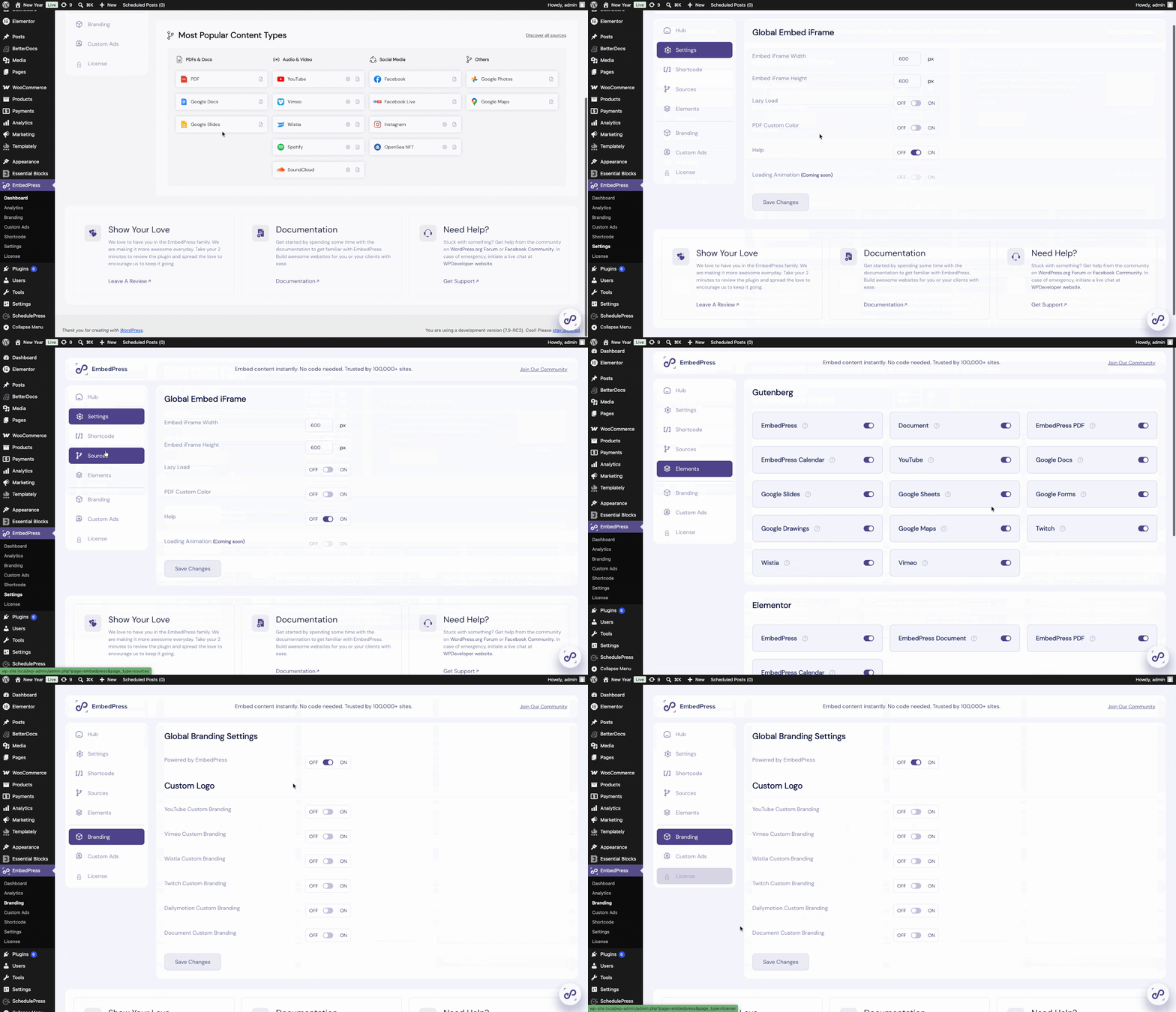
Right after you install EmbedPress, you are greeted by an incredibly friendly interactive setup wizard. This smooth onboarding process walks you through exactly how to configure your global settings. You can easily adjust your brand colors, manage premium features and set default viewer sizes from a beautiful visual dashboard.
It is designed perfectly for anyone from beginners to seasoned professionals. If you prefer a highly visual and modern workflow to embed PDF in WordPress, the native Gutenberg blocks in EmbedPress offer a more interactive building experience.
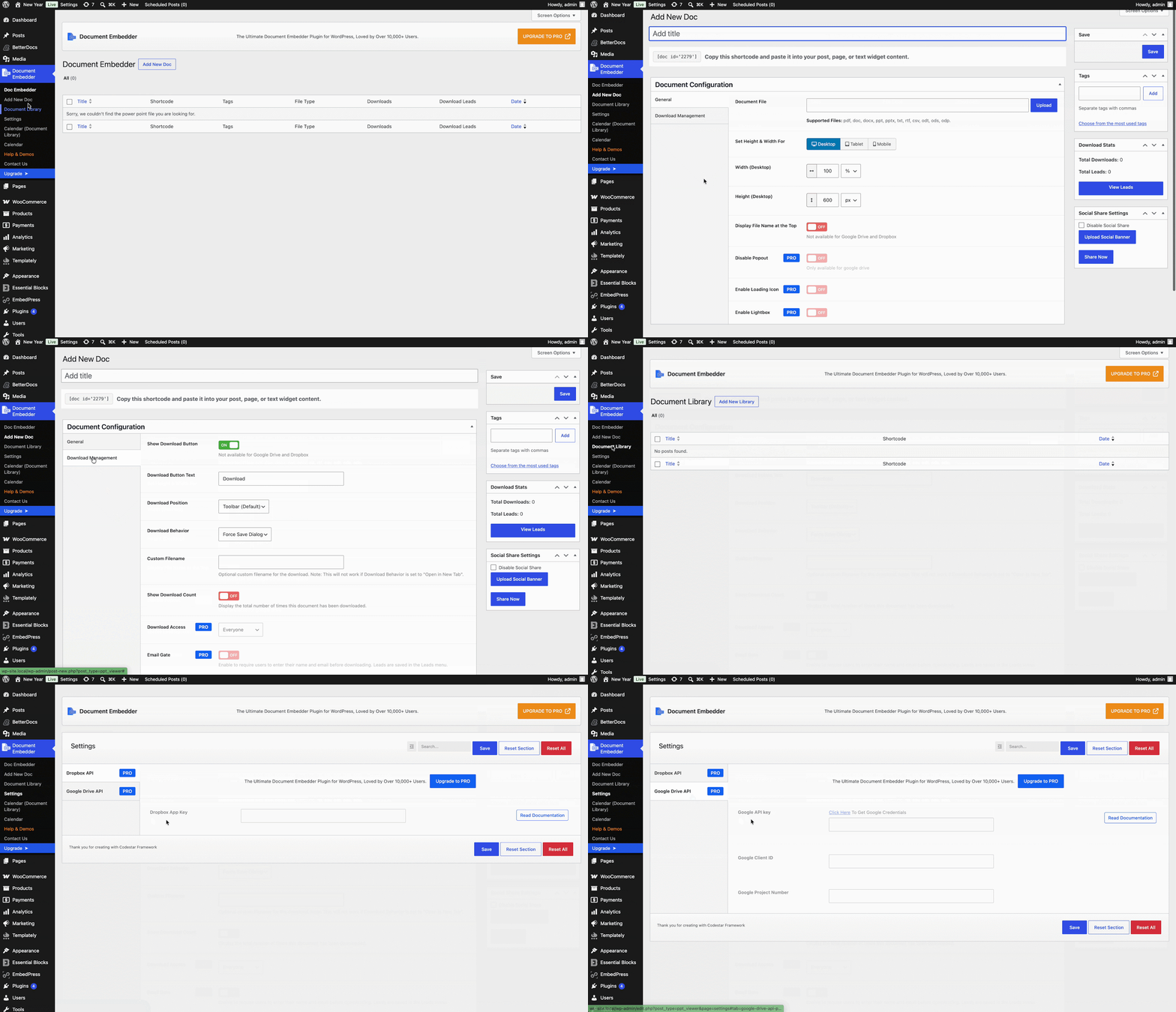
The Document Embedder plugin takes a very straightforward and minimalist approach. It is built for users who want a simple setup without too many extra settings to manage. It has easy and quick options to add new documents, check the document library, update the calendar and more.
📂 Supported Files: EmbedPress vs Document Embedder
When we look at the EmbedPress vs Document Embedder plugin comparison, we see two different styles of sharing. The Document Embedder plugin acts as a focused specialist for office files. It uses trusted Google and Microsoft tools to show your Word, Excel, PowerPoint, Apple Pages, PSD, PDF and more than 10 Types of documents clearly and reliably.
If you mainly need to share those specific documents, it is a fine choice for your site. However, many modern websites now want to offer a wide variety of media. This is where EmbedPress acts as a versatile hub for your content strategy.
EmbedPress handles those standard office files perfectly and also supports over 250 other sources. You can share YouTube videos, Spotify songs, live Google Maps and social media posts without adding any extra software.
When you think about EmbedPress vs Document Embedder, having one single place to manage all your media is a great benefit. Plus, EmbedPress allows you to turn flat papers into amazing 3D flipbooks. This feature makes reading long reports feel like holding a real magazine.
🎨 Customizing Your Media for a Beautiful Look
A big part of a great website is making it look exactly the way you want. The Document Embedder plugin provides a clean and classic look by letting you change the width and height of your files. This keeps your pages feeling consistent and simple.
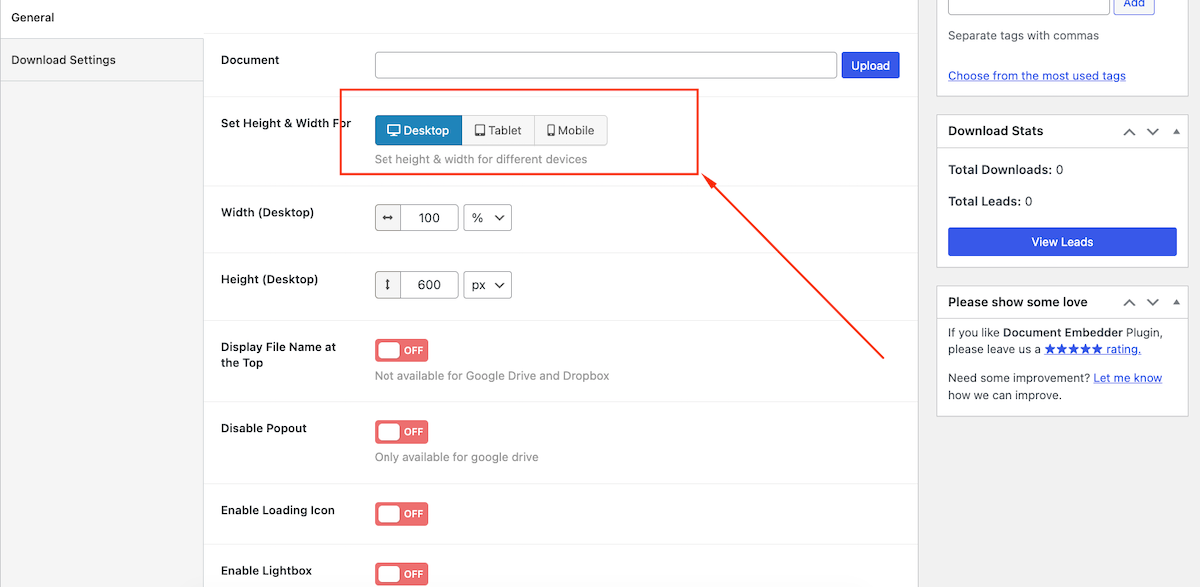
[Image Source: Document Embedder]
In the EmbedPress vs Document Embedder comparison, EmbedPress offers more creative freedom with a full styling menu inside your WordPress dashboard. You can change colors, add your own logo and place clickable buttons right over your files to match your brand perfectly.
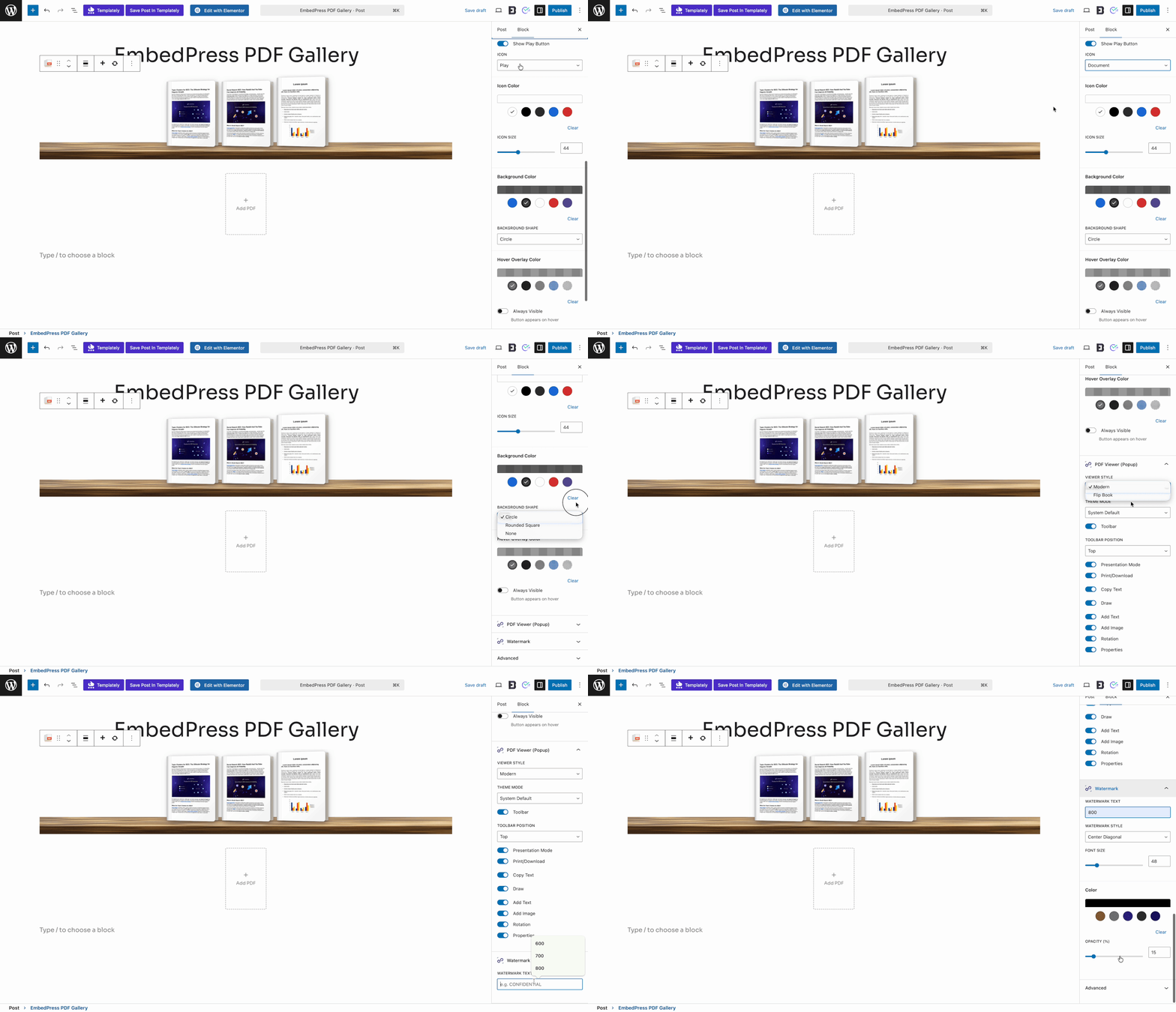
EmbedPress also gives you pro controls to keep your files safe. You can lock special files behind passwords. If you want to safely embed PDF in WordPress while keeping it private, this is a very helpful feature. You can even put ads on your videos or use social sharing buttons to help your content grow. EmbedPress also includes smart loading tricks to keep your pages running very fast.
📈 Analytics & Performance Tracking
It is always helpful to know how people are using your website. The Document Embedder plugin is great for simple hosting where you just want the file to be available to your readers.
When comparing EmbedPress vs Document Embedder, EmbedPress adds an extra layer of data-driven insights. It has smart features to help you measure exactly what your readers are doing. You can see if they are watching your videos, clicking your links and actually reading your stories.

While basic plugins show the file to your visitors, the tracking in EmbedPress helps you understand their behavior. This information makes it much easier to decide which content your audience likes best. This is why many marketers consider it the best document embed plugin for growing a business.
Frequently Asked Questions (FAQs)
Which plugin is better for getting found on Google?
When comparing EmbedPress vs Document Embedder for getting found online, EmbedPress takes the lead. Features like fast loading and 3D flipbooks keep people on your page longer. Search engines notice this, so a fun WordPress document viewer tells Google your site is awesome.
Will showing large PDFs slow down my website?
It absolutely can if you do not use the right tools. If you use EmbedPress to embed PDF in WordPress, you can use the lazy loading trick. This means the file only loads when the reader scrolls down to it, keeping your site super fast.
Are these plugins easy for beginners to learn?
Yes, both plugins are very friendly. Because EmbedPress is built right into Gutenberg, it feels much more natural. You do not need to be a computer genius to build a great site. You just drop the block onto your page, paste your link and hit publish.
Is it a smart idea to buy a premium version?
If you want your website to grow, the Pro version of EmbedPress is the best document embed plugin you can get. It unlocks custom colors, password protection, fun ads and the amazing 3D flipbook feature. It is a great way to turn quiet readers into happy fans.
✨ Make Your Choice Based on Your Needs: EmbedPress vs Document Embedder
The internet is far too busy for boring websites. You cannot afford to write amazing stories only to have visitors leave because the reading experience is clunky.
The EmbedPress vs Document Embedder debate comes down to what you want for your future. If you run a tiny blog and only want to show simple spreadsheets, the Document Embedder plugin is a fine choice. It is light and handles basic files okay.
However, if you want to build a truly modern website, EmbedPress is the clear winner. It is the ultimate WordPress document viewer because it handles your PDFs while acting as your magic hub for 250+ other media sources. You let your visitors read, watch and listen without ever leaving your site.
Start building your dream website today. Download EmbedPress and discover how incredibly easy it is to bring your pages to life!
Do not forget to share your thoughts in the comments and join our Facebook community. You can also subscribe to our blog for helpful guides, fun tips and the latest WordPress news.