Offering a website visitor a plain, static PDF link in 2026 feels a little bit like handing them a floppy disk. If your goal is to showcase brochures, portfolios, magazines or reports, forcing users to download a bulky file or open it in another new browser tab is the fastest way to lose their attention. What you really need is a dedicated solution that keeps them glued to your page.
Today, we are putting two heavyweights in the ring: DearFlip vs EmbedPress. If you are looking to avoid those old-school download links, it is time to explore the newest and most engaging solutions available.
In this comprehensive guide, we will explore and compare these two popular tools to find out which one truly reigns supreme as the ultimate WordPress flipbook plugin. Let us begin.
Why You Need a Flipbook Plugin in WordPress Right Now
To truly appreciate the power of a modern WordPress flipbook plugin, we have to remember the dark ages of web document sharing. Not too long ago, site owners had to rely on custom coding or basic media uploads. Users would click a link, wait for a heavy file to download and suddenly, they had completely left your website. It broke the user journey, ruined your site’s bounce rate and looked incredibly unprofessional.
There was zero control over the presentation. You could not track engagement, you could not customize the viewer to match your brand colors and you certainly could not stop people from downloading and copying your proprietary documents.
Thankfully, the scenario has completely transformed. Today, an interactive PDF viewer turns a boring document into a digital reading experience. By using a robust plugin, you can take a standard flat file and instantly create a flipbook in WordPress that mimics the experience of reading a real magazine, complete with page-turning sound effects, responsive zooming and beautifully integrated branding.
Using the right tool gives you the absolute freedom to keep your visitors engaged, save hours of coding time and present your content in the most professional light possible.
In-Depth Comparison: DearFlip vs EmbedPress
When you start hunting for a tool to build that perfect digital catalog, you might want to compare DearFlip vs EmbedPress, two of the best plugins of their kind. Both are highly respected and offer fantastic features to make your documents shine. But which one is the perfect fit for your specific workflow, skill level and website goals?
Let us break down this DearFlip vs EmbedPress battle category by category so you can make the most informed choice.
Ease of Getting Started & User Interface
The very first hassle for any site owner is usability, whether you are a beginner or a seasoned developer. You want a tool that works out of the box, not one that requires a manual Interactive PDF Viewer just to get a basic preview running.
EmbedPress: The Quick Setup Wizard And Visual Dashboard
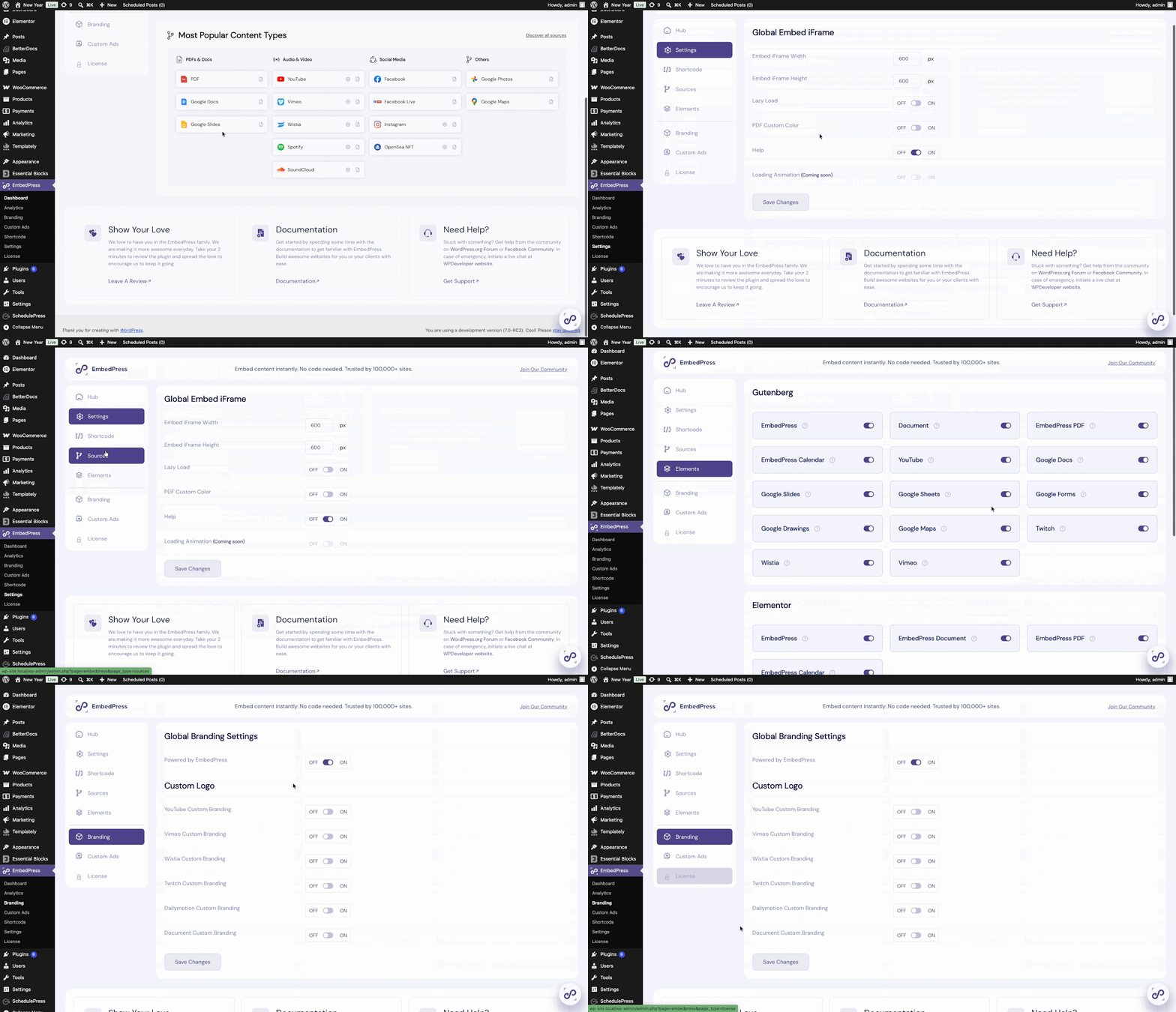
Right after you install and activate EmbedPress, you are greeted by a friendly, interactive setup wizard. On the plugin’s dashboard, it walks you through exactly what it can do, how to configure your global settings, what it offers, links to help guides, etc.
You can easily navigate through global parameters – like setting your default iFrame height, adjusting your brand colors, or managing your premium features. It is built entirely with the user in mind, requiring absolutely no coding knowledge.
DearFlip: Functional But Requires A Guided Tour
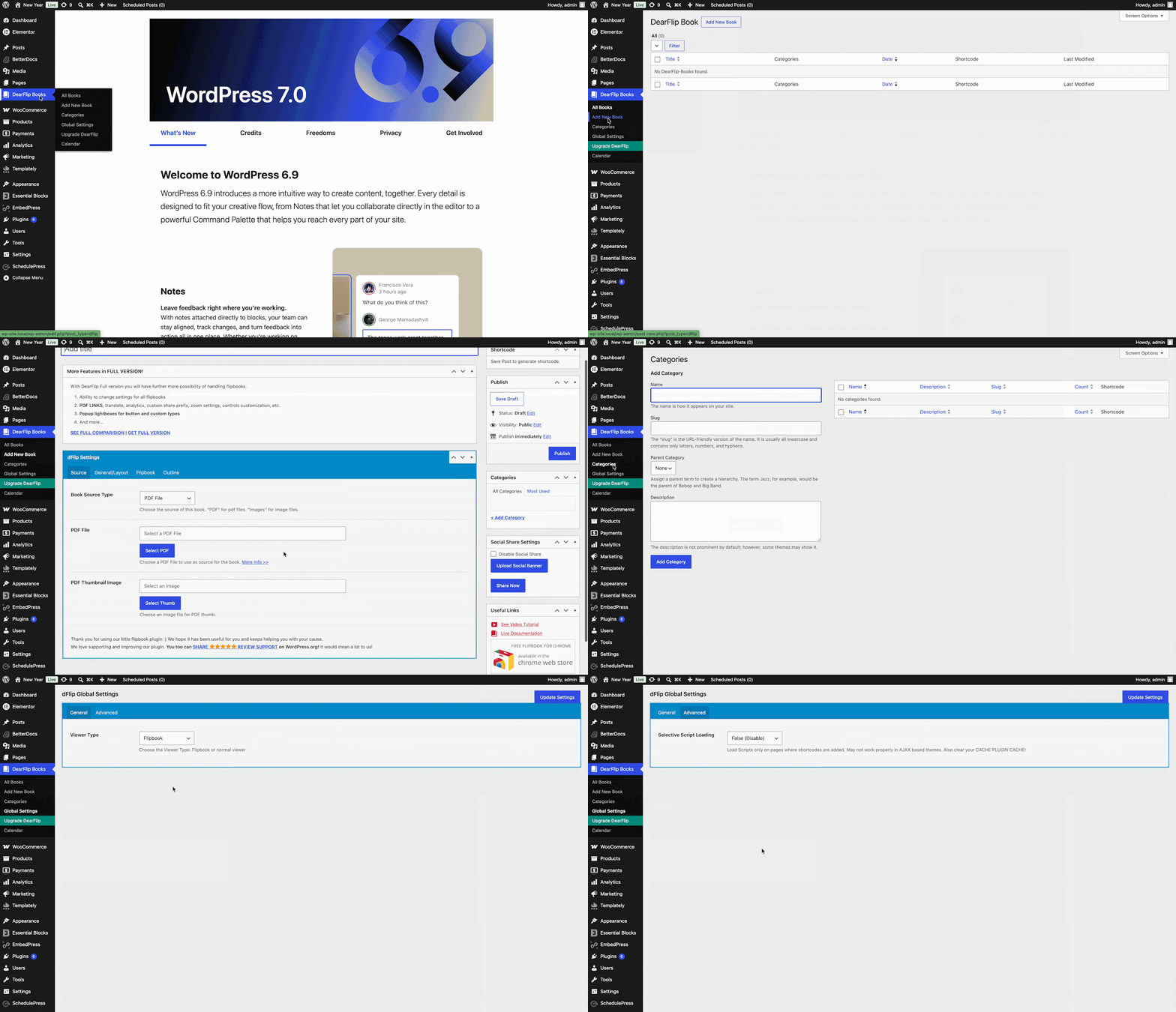
DearFlip, on the other hand, takes a slightly more traditional approach. While it skips the interactive setup wizard, its settings are neatly organized right in your WordPress sidebar. The dashboard is clean and offers deep control over your global flipbook templates.
While beginners might need to spend a few extra minutes clicking around to understand the setup flow compared to EmbedPress’s instant onboarding, the structure is logical and very familiar for anyone used to classic WordPress plugin interfaces.
Supported File Types & Formats
A great plugin should be flexible. What happens if you want to embed more than just a PDF stored on your own server? Let us see how they stack up.
EmbedPress: Supporting 250+ Embedding Sources
This is where EmbedPress shines brighter. Yes, it can beautifully display the PDFs you upload directly to your WordPress media library. But it goes so much further. If you have documents hosted externally on platforms like Google Drive or Dropbox, you can embed them just by pasting the URL.
Beyond documents, EmbedPress is famous for supporting over 250+ different content sources (YouTube, Instagram, Spotify, Google Maps, you name it). It is not just a document viewer; it is a complete media embedding powerhouse.
DearFlip: Highly Specialized for Documents and Images
DearFlip is laser-focused on its primary job. It is exceptional at taking PDFs and standard images (like JPEGs or PNGs) and converting them into a beautiful 3D PDF flipbook. It is a dedicated document viewer built for those who only need flawless flipbooks without the extra bloat of non-document features. If your sole focus is publishing magazines or catalogs, DearFlip provides exactly what you need.
Viewer Customization Options
Once your document is on the page, you want it to look like it belongs there. Customization is key to maintaining your brand identity.
EmbedPress: Live Previews And Total Visual Control
EmbedPress hands you the keys to the castle. The best part? You can customize your interactive PDF viewer directly inside your page builder (like Gutenberg or Elementor) and see the changes happen live.
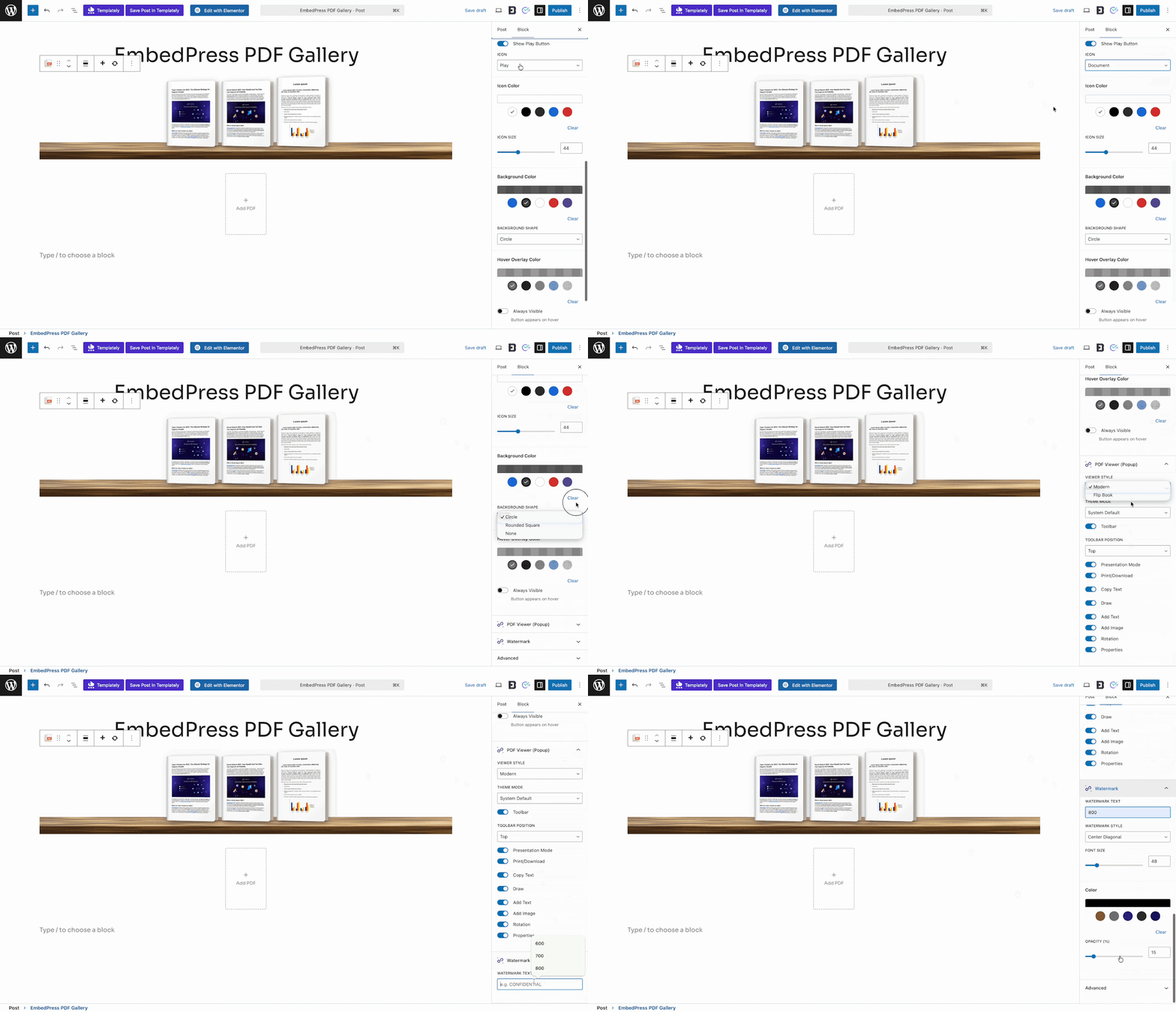
Want to change the theme to a sleek dark mode? Done. Need to adjust the exact pixel height or remove the default branding and add your own company logo? Easy. You can choose whether to display a classic scrollable document or toggle on the beautiful 3D PDF flipbook mode. You also control the toolbar to decide exactly what your readers can do: zooming, printing, or entering presentation mode. It is a completely tailored experience that requires zero CSS.
DearFlip: Powerful But Backend-Heavy
DearFlip offers a massive array of customization options for your flipbooks. You can tweak the lighting, the page thickness, the background colors, and the control panels. To achieve this level of detail, DearFlip relies on robust backend settings and shortcode parameters.
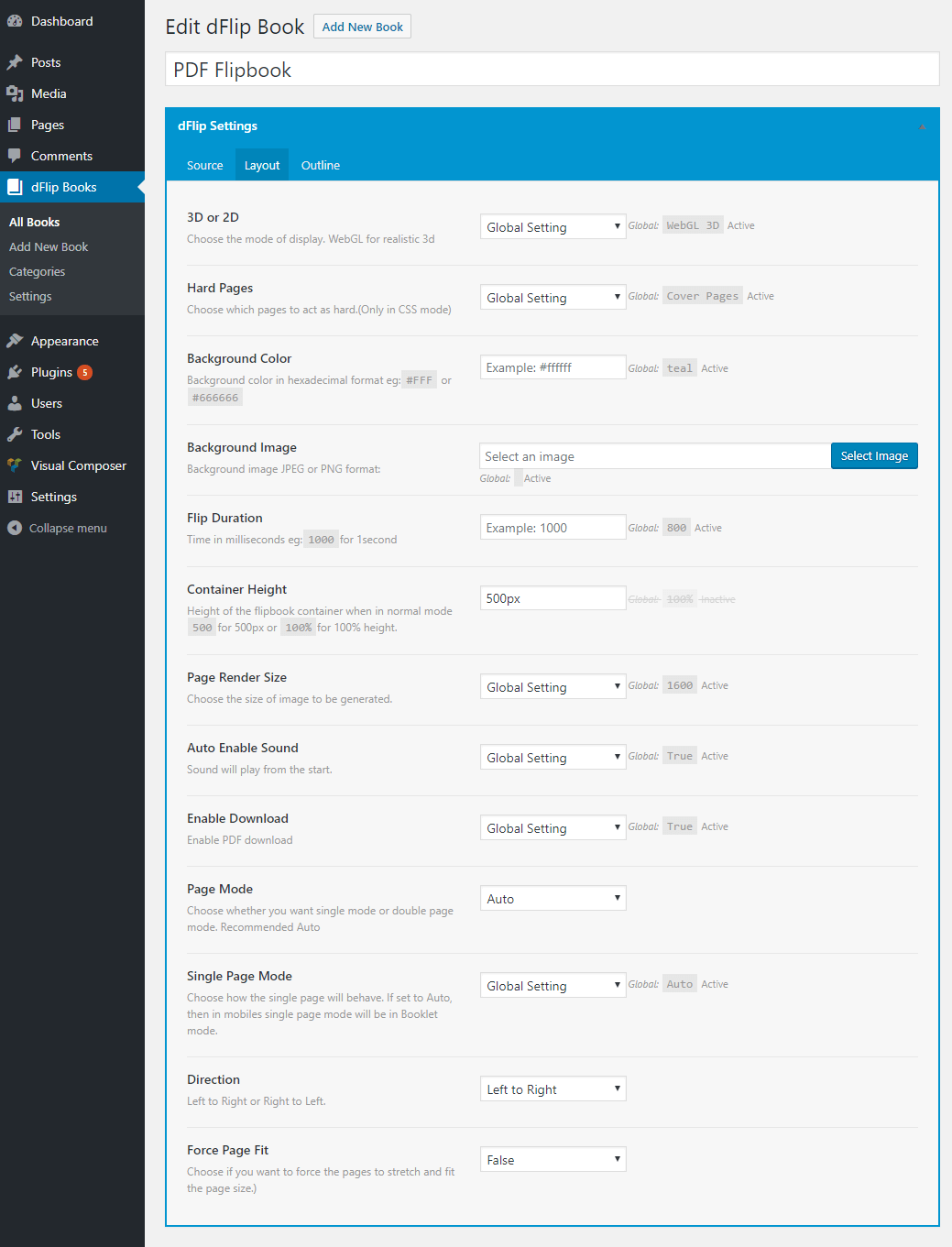
Image Source: DearFlip
This allows for incredibly granular control over the final look, though it does mean you will be saving your settings in the dashboard and refreshing your live page to view the updates, rather than using a live page builder preview.
The Flipbook Experience
Both plugins allow you to create a flipbook in WordPress, but how do the actual reading experiences compare? If you are looking for the best flipbook plugins, let us find out which one to choose.
EmbedPress: Seamless and Effortless 3D Flipbooks
With EmbedPress, turning a boring document into a stunning 3D PDF flipbook is literally a one-click toggle. It is fast, lightweight and gives your readers that satisfying page-turning animation and sound effect. The beauty of EmbedPress is that this feature is integrated into its broader ecosystem.
You do not need a separate dedicated flipbook tool; your all-in-one embedder does it perfectly, providing smooth pagination and a highly engaging, interactive reading experience.
DearFlip: The Specialized 3D Engine
Because DearFlip was built exclusively for this purpose, its 3D engine is incredibly robust. It uses WebGL to render highly realistic pages.
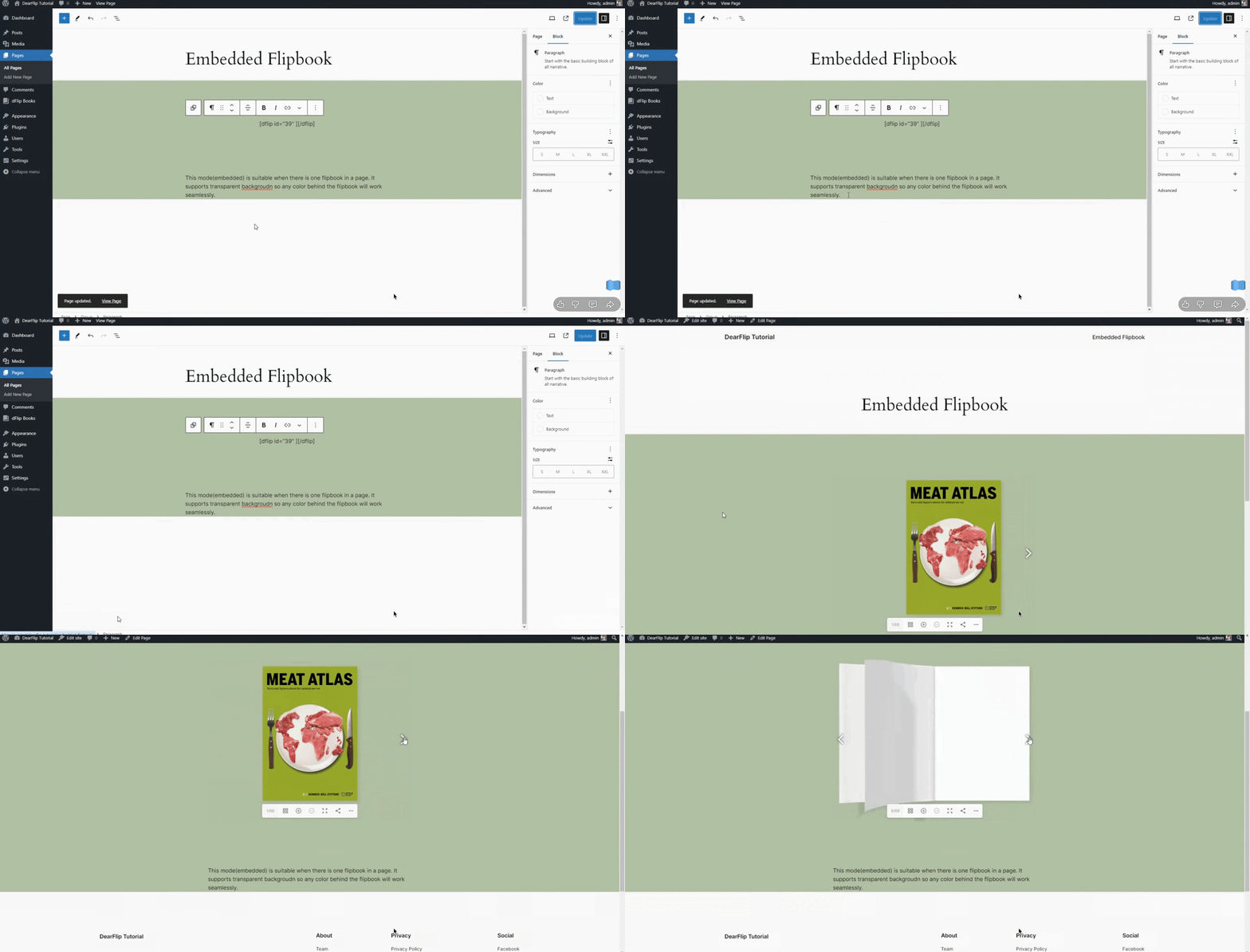
If you are building an ultra-premium digital magazine where you need to control the exact “stiffness” of the digital paper or the precise angle of the lighting hitting the spine of the book, DearFlip offers a highly specialized, hyper-realistic viewer that is hard to beat for pure visual fidelity.
Security, Access Control & File Hosting: DearFlip vs EmbedPress
If you are sharing premium e-books, internal company reports or gated lead magnets, security is non-negotiable.
EmbedPress: Rock-Solid Content Protection
EmbedPress understands that not every document is meant for the public. It offers exceptional content protection features. You can lock your interactive PDF viewer behind a custom password, or restrict access based on specific WordPress user roles (e.g., only letting logged-in “Subscribers” see the document).
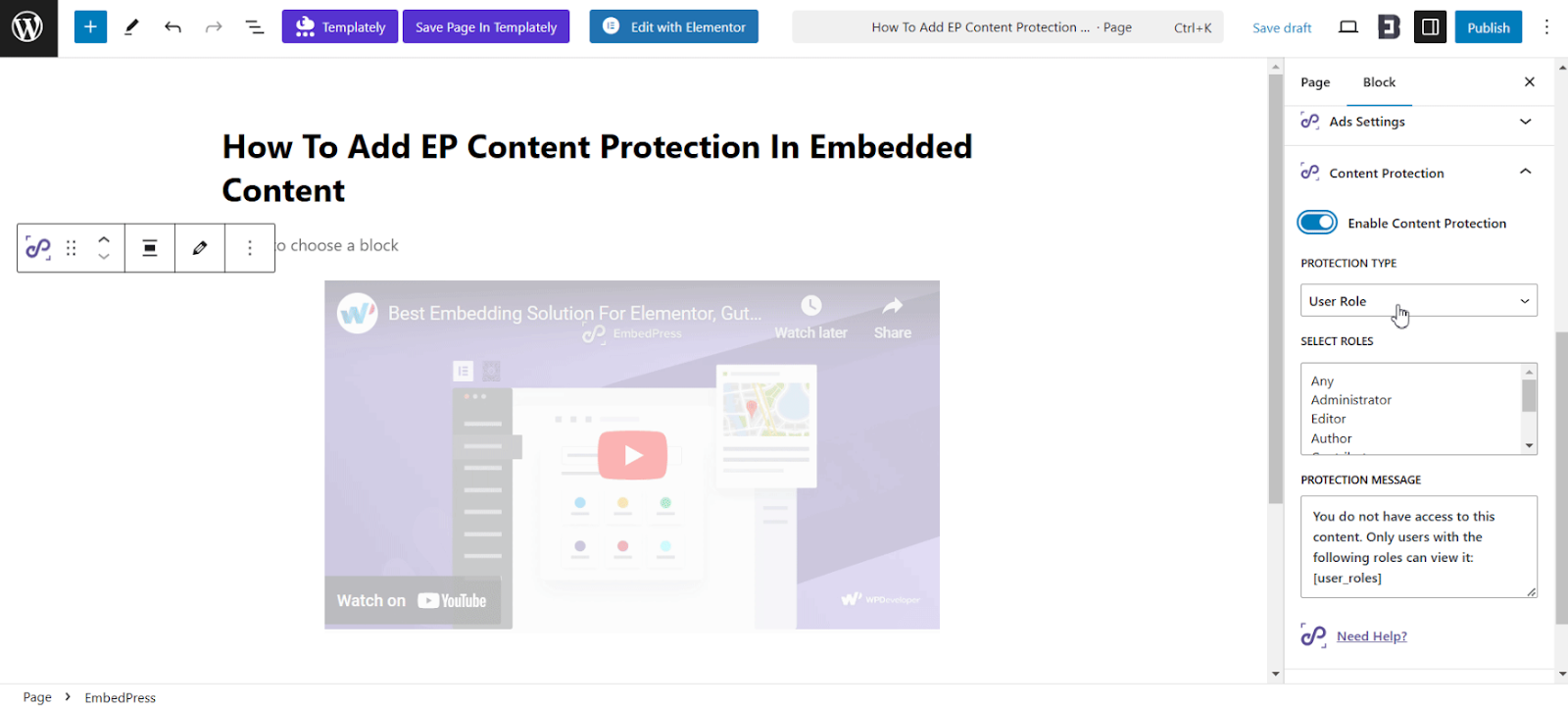
Furthermore, you have total control over the toolbar. Do you want users to read the document but not distribute it? Simply toggle off the download and print buttons with a single click. Your self-hosted files remain secure, and you dictate exactly how users interact with them.
DearFlip: Secure And Controllable
DearFlip also provides excellent security measures. You can easily disable the download and print options to protect your intellectual property. It also ensures that your self-hosted PDFs are served securely, keeping unwanted web scrapers from easily snatching your raw files.
Gutenberg & Page Builder Compatibility
The way we build WordPress sites has changed. A plugin must play nicely with your favorite page builder. Let us see how DearFlip vs EmbedPress handle modern site building.
EmbedPress: Native Integration Everywhere
If you use Elementor, Gutenberg, Divi, or Beaver Builder, EmbedPress feels like a native extension of your toolkit. You get dedicated blocks and widgets. You do not have to memorize shortcodes; you just drag and drop the EmbedPress widget onto your canvas, paste your URL and use the visual menus to style your WordPress flipbook plugin. It is the definition of beginner-friendly and fits perfectly into a modern design workflow.
DearFlip: Shortcode And Basic Block Reliant
DearFlip does offer a Gutenberg block to help you easily place your flipbooks into the default editor. For those using page builders like Elementor or Divi, DearFlip provides a highly reliable shortcode system. Generating your flipbook in the backend and pasting the shortcode is a tried-and-true WordPress method that ensures your content displays perfectly, even if it skips the drag-and-drop widget style.
Mobile Responsiveness & Optimization
In 2026, more than half of your website traffic is likely coming from mobile devices. If your documents look broken on an iPhone, you will lose readers instantly.
EmbedPress: Fluid out of the Box
EmbedPress guarantees a fully mobile-responsive interactive PDF viewer. Whether your user is on a desktop, a tablet or a smartphone, the viewer automatically adapts to the screen size. The fluid layouts ensure there is no frustrating horizontal scrolling. In flipbook mode, users get intuitive touch support – allowing them to swipe to turn pages and pinch-to-zoom easily.
DearFlip: Excellent Responsiveness on PRO
DearFlip ensures your documents are viewable on mobile devices right from the free version. For those who want the absolute best touch experience, upgrading to their Pro version unlocks a beautifully optimized mobile viewer. It handles swipe navigation, pinch-zooming and dynamic resizing flawlessly, ensuring your mobile readers get a premium experience.
Which Offers Better Value: EmbedPress PRO vs DearFlip PRO
While the free versions of both plugins are generous, serious creators usually upgrade. When evaluating DearFlip vs EmbedPress, let us look at what the premium tiers unlock.
| Premium Features / Capabilities | EmbedPress PRO | DearFlip PRO |
| 3D Flipbook Generation | Included (One-Click) | Included (Advanced 3D) |
| Live Page Builder Customization | YES (Native Widgets) | NO (Shortcode Reliant) |
| Password / Role Protection | YES | YES |
| Custom Branding & Logos | YES | YES |
| Embed 250+ Other Media Sources | YES | NO (Documents Only) |
| Custom Colors & Theming | YES | YES |
| Analytics & Tracking | YES (Advanced Add-ons) | Google Analytics Integration |
When it comes to pure return on investment, EmbedPress offers an undeniable edge. While DearFlip is a fantastic, specialized tool for creating a 3D PDF flipbook, EmbedPress gives you a premium flipbook generator plus the ability to embed external links, videos, audio and social feeds. It is essentially an entire suite of tools wrapped into a single subscription.
Reflect on User Reviews & Community Feedback
You do not just have to take our word for it. Looking at the WordPress repository, both plugins boast incredible community feedback.
DearFlip has built a strong, loyal user base of people who specifically want to create a flipbook in WordPress and love the realistic WebGL rendering. It maintains high ratings and offers reliable support for its users.
EmbedPress, however, is an absolute face in the community. With hundreds of thousands of active installations, it is trusted by agencies, bloggers and major brands alike. Its impressive 4.8 out of 5-star rating is a testament to the WPDeveloper team’s commitment to frequent updates, stellar customer support and listening to user feature requests.
Final Verdict: The Best Flipbook Solution in WordPress
In the great debate of DearFlip vs EmbedPress, both plugins prove they are highly efficient in getting the job done.
If your only goal in the world is to build the most hyper-realistic, graphically intense 3D document possible and you do not mind working with shortcodes and backend settings, DearFlip is a magnificent, specialized tool that truly masters its craft.
However, if you value workflow speed, user experience, and versatility, EmbedPress clearly stands out as the superior choice for modern WordPress users. Whether you are a solo blogger wanting to share a readable e-book or a massive agency managing dozens of client portfolios, EmbedPress removes all the friction. It empowers you to present your documents beautifully, functionally and without any technical headaches.
Ready to transform your static documents into an engaging experience? Give the ultimate WordPress flipbook plugin a try today, and let us know in the comments how it changes your site’s engagement!
If you have found this blog helpful, share your opinion in the comment section and get connected to our Facebook community. You can also subscribe to our blogs for valuable tutorials, guides, knowledge, tips and the latest WordPress updates.